How can we help you?
Tell us what you are looking for
What is a limit order?
A limit order is an instruction to buy or sell an asset only at a specified price or better. It gives you full control over the price at which you wish to execute your trade. In exchange for this control, a limit order does not guarantee execution if the market price does not reach your limit.
How does it work?
- For a Buy. You set the maximum price (limit) you are willing to pay. The order will be executed only if the asset can be purchased at or below that limit price.
- For a Sell. You set the minimum price (limit) you are willing to accept. The order will be executed only if the asset can be sold at or above that limit price.
The limit order is a "resting" order that waits in the market until it can be filled at your specified terms or until it is cancelled.
Advantages:
- Price Control. Guarantees you will not pay more (when buying) or receive less (when selling) than your specified price.
- Planning Efficiency. Allows you to plan trades in advance at price levels you consider favourable, without constantly monitoring the market.
- Cost Reduction. Helps avoid execution at unfavourable prices during sudden market moves or low liquidity.
Risks and Considerations:
- No Execution Guarantee. If the market price never reaches your limit price, the order may remain unfilled (pending). You might miss a market opportunity if the price moves in the opposite direction.
- Partial Fill. It is possible for your order to be only partially filled if the available market volume at your price is limited.
When to use a Limit Order?
- When you have a specific target price for buying or selling.
- When you want to buy at a "discount" (below the current market price) or sell at a "premium" (above the current market price).
- When trading low-liquidity assets and you want to avoid execution at an unexpectedly unfavourable price.
How to submit a Limit Order in EFOCS?
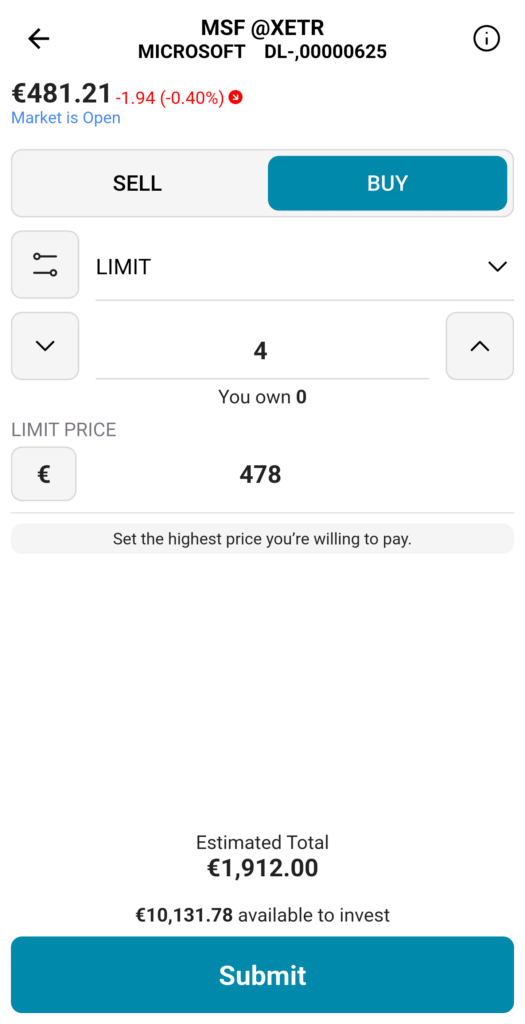
- Select the order type. From the dropdown menu select "LIMIT".
- Enter quantity. In the quantity field, specify the number of shares, units or face value (for bonds) that you wish to buy or sell.
- Set the LIMIT PRICE. This is the highest price you are willing to pay (for a buy), or the lowest price you are willing to accept (for a sell). Enter your desired price in the "LIMIT PRICE" field. The application will display the "Estimated Total" of your order, calculated using your limit price and quantity (e.g., €300 for 2 shares). This represents the maximum amount you will pay (for a buy order) or the minimum amount you will receive (for a sell order).
- Submit the order. Click on the “Submit” button.
- Order Status. Your order will appear in the “Pending” orders section and will remain active until it is executed, cancelled by you, or expires.